Friday, August 17, 2012
BlackBerry executive confirms BlackBerry 10 is for real, “the hardware and software is there”
Tuesday, July 24, 2012
Four Essential Summer Olympics Smartphone Apps
Who could forget Michael Phelps’ famous seventh gold medal win in the 100-meter butterfly final in Beijing? Phelps won by the thinnest of margins, 0.01 of a second, which was incredible to watch! With narrow victories and nail-biting events, just like Phelps’, this year’s Olympic Games are sure to be one of the most exciting ones yet. In anticipation of the games, we’ve gathered a few smartphone apps that will make watching the games even more exciting. As the Olympics progress, let us know which one is your favorite!
- BBC Olympics app: While NBC is the official network carrying the Olympics for Americans, BBC is Britain’s main news network reporting on the games. Their free app, which is available on iPhone, Blackberry and Android devices, provides users a text-based rundown of the current events and scores. Live updates and commentary from BBC reporters and Olympians are also included in the app. Users can find a breakdown of the number of medals won by each country. Plus, the app is location-based! So, if you’re checking it from the U.S. it will include more news and updates about the U.S. team.
- NBC 2012 Summer Olympics app: With free, live streaming of the games from NBC’s Olympic app, you won’t miss anything! Whether you’re operating from an iPhone or an iPad, the app is very video-focused. Users can tap into NBC’s social media profiles to see updates and interviews with athletes as well as scheduled events. However, we noted that the app isn’t 100-percent free. To watch all of the videos users must verify their cable and/or satellite subscription. Perhaps the coolest element of the app is the push notifications, where users can receive updates about their favorite sports or athletes.
- Curly’s Pocket Guide to Sports: Available on iOS devices, this app has information about each sport and its associated rules. If you’re planning to watch a sport you don’t know a lot about—aka archery—this app lays out the guidelines and rules in a witty way and even adds in some interesting trivia!
- The 2012 Team USA app: The official app released by the U.S. Olympic Committee offers several of the same features as the three previous apps. Just like NBC, they ask that you verify your cable and/or satellite subscription before you can watch videos. One of the most fun elements of this app is the “cheer” button, which lets users send a personal message to athletes on Facebook and Twitter. Users can also purchase Team USA gear and even donate to help support the team, from within the app. Some have noted that the news tab loads slowly.
Thursday, May 17, 2012
Keeping Kids Safe this Summer with Smartphone Apps
Tuesday, May 15, 2012
Missed Call, Missed Opportunity
Wednesday, May 9, 2012
Three Must-have Fitness Apps
- Nike Training Club: This is one of our favorite applications because it’s practically a personal trainer. Users select which goal they want to achieve: lean, toned, strong or focused. With each goal, users can then select a level: beginner, intermediate or advanced. The app breaks down each workout move by its name, how many reps or the length of time you need to do the move. It’s easy to use and free! We highly recommend for users who have access to an iPhone or iTouch. Nike hasn’t created an application for Android owners, yet.
- MyFitnessPal: This app is gaining more popularity among smartphone users. It’s a food diary that calculates how many calories a user needs to consume in order to lose or gain weight. It breaks down how many calories you’re allotted for that day based on the information you enter. If you have trouble remembering exactly what you ate for breakfast, lunch and dinner you can enter it online or on your smartphone before or after your eat. In addition to the food diary, users can enter the amount of time spent doing cardio or strength training. The app also has an optional social setting so users can share their diet with friends. MyFitnessPal is available for iOS and Android operating systems.
- MapMyFitness: One of the coolest applications on the market for outdoor lovers is MapMyFitness. Whether you like to bike, walk or run, this app loads nearby trails, tracks your time, updates you on your overall progress and keeps your pace. Plus, users can share their location with friends! If you’ve been dying to spend time in the sun and enjoy local trails, this is the app for you!
Thursday, May 3, 2012
Pinning our Interests
- Phones: You’ll find fun phones, infographics, funny quotes and the latest gear for your smartphone on this board. Right now, we’re loving the Dr. Dre’s Beats pin.
- Safety Tips: Safety is one our top concerns, and we’re proving it with our “Safety Tips” board. Stop by and you’ll see tips on everything from traveling with your smartphone to keeping kids safe in the cyber world.
- App Hotspot: We’re sharing the coolest apps with our fans. Duh. In fact, we’ve got the newest apps for fitness-gurus, kids and busy businessmen and women. Have an app you love? Pin it and tag us [at]privusmobile!
- Vintage: We’ve all seen Grandma’s old dial phone—there’s something about the spin dial that makes us want to call new friends all day! Anyway, we’re always looking for items of nostalgia, so send us some ideas.
- Tech Tips: Wet smartphone? Dirty smartphone? Data-demanding smartphone? Our “Tech Tips” board has all insider information from the experts on how to keep your iPhone or Android phone as clean and well-kept as the day you bought it.
Tuesday, April 17, 2012
Going on vacation with your smartphone: five tips every traveler needs to know
- Itinerary: Travelers who are flying should always have their itinerary downloaded on their phone. Most airlines also have smartphone applications that allow travelers to check in to their flight, monitor arrival and departure times and watch for cancellations.
- Budget: Traveling expenses can add up quickly, so it’s important to keep track of your vacation budget. There are multiple applications on the market that can keep travelers on budget, including Money Book, Mint or EasyMoney. All three allow travelers to allocate funds based on categories like food, clothing, activities and gas.
- Battery Power: From car chargers to adapters, smartphones need access to power, especially when being heavily used! Having a full battery will keep travelers on route, on time and on top of plans.
- Directions: Whether it’s directions to the hotel or local restaurants, smartphones can provide driving directions, reviews, suggestions and check-in opportunities. Travelers who want to take advantage of public transportation can download BusTime or Go To There. Many cities also have specific applications that update the location of buses, metros and subways in real time.
- Memory Making: Pictures capture memories of a vacation long after it’s over, so take plenty! If you’re feeling creative, try applications like Instagram or PicFrame. Want to share a photo with a co-worker or family member? Both applications have social capabilities so snap away.
Monday, April 9, 2012
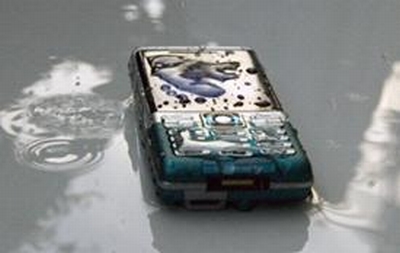
Four Tips to Save Your Wet Smartphone
- First, get in there and get it out! Whether it’s a pool or a washing machine, you have to retrieve the device. Once you do, immediately remove the battery and SIM card. Do not turn the device on. This can cause short circuits that are irreversible. Be sure to dry the battery off as quickly as possible.
- With a soft towel or cloth (not paper towels because particles of the paper may stick inside your phone) gently wipe the water off of the keypad, screen and battery area. Be sure to avoid the hairdryer. Heating your phone can be just as harmful as dropping it in water. Some recommend putting the phone near a dehumidifier or on top of a cable box. Both will draw out the water.
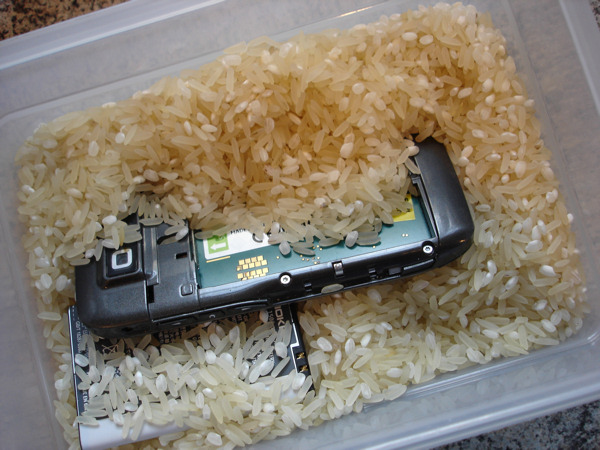
- Grab a big bowl and fill it with white or brown rice. We strongly discourage using rice with flavoring or seasoning because it could get stuck in your phone. Stick your phone face down in the rice for at least 48 hours; the rice will absorb the water. After 48 hours take it out of the rice and turn it on. If the device does not turn on, return it to the rice for another 24 hours. Continue
until you pull your hair outuntil you feel that your phone has had enough. - Try using a compressed air can like the ones sold at computer stores. Hold the can straight up and down when spraying your phone. Holding it sideways, upside down or at an angle will discharge a freezing liquid damaging your phone further. Spray the air into speaker, microphone, keypad and hard-to-reach crevices.
| Your phone may look like this now, but... |
| Throw it in some rice and you could end the week looking like... |
| THIS! |
Monday, April 2, 2012
Dr. Gordblower’s Museum of Privacy
Friday, March 23, 2012
With its game, Swine Flew, Privus Mobile brings fun and flying pigs to iPhone owners
In the mobile gaming world, pigs are one trending topic (see Angry Birds). In fact, gamers can’t seem to get enough of the squealing animal. So what better way to satisfy our fans than to develop a game with flying pigs?! We are so excited to introduce our brand new mobile game, Swine Flew! Because it’s our first game, and we love our readers, we’re giving you an inside look into to the game!
Swine Flew is an addictive game of skill and chance that’s sure to provide you with hours of fun. Featuring flying swine traveling above scenic farmland, players aim to eliminate each pig one by one with the ammunition from one enemy pig. Swine Flew is different from other games because players don’t need to start at level one. In fact, players can start at level 12 and attempt to eliminate as many as 13 pigs. Each level brings a more challenging test of players’ reflexes.
iPhone owners can download Swine Flew from Apple’s App store or iTunes and begin the exciting game in a matter of seconds. We’re offering one free ad-supported application and another without the ads for 99 cents. Both can be downloaded by visiting the App Store on any compatible iOS device.
For more information about our complete line of smartphone applications, visit www.privusmobile.com.
Don’t forget to leave a comment or two and let us know what you think about the game!
Thursday, March 15, 2012
March mobile madness: three apps to keep you in the loop
March Madness has officially begun! But unless you’re a college student on Spring Break or work at ESPN you probably don’t get to watch the NCAA tournament games live. Don’t worry, there’s an app for that! In fact, to keep you up to speed with all 67 games—and the office basketball bracket—we have three smartphone apps to get you through the madness.
1. NCAA’s 'March Madness Live' is the king of all March Madness applications! It provides the latest scores, news updates, bracket creators and up-to-the-minute alerts that notify you when a game ends or goes into overtime. Plus, it also has a live chat feature that allows you to post bracket info (and bragging rights) to Facebook and Twitter.
2. ESPN Bracket Bound 2012 is one of the most popular free applications. To keep track of the live bracket just tap "My Bracket" and all of your teams and their scores show up. In addition, news and highlights of games show on the home screen in a slide show. You can also catch details, highlights and players’ statistics on the application.
3. Twitter is a must for sports junkies! With ESPN reporters, bloggers and even players tweeting about the games, it’s the obvious place to catch breaking news. Here are a few we suggest following: sports writers Jeff Goodman @GoodmanCBS and Andy Katz @ESPNAndyKatz tweet scores, highlights and industry insight. North Carolina player Kendall Marshall @KButter5 will provide an inside look from a player’s standpoint, while Sport Illustrated stat man Luke Winn @lukewinn does all the math so you don’t have to! Plus, all of the teams have individual Twitter handles!
Finally, all of the apps are available on both Apple and Android devices. Do you have a favorite sports application? Feel free to share your thoughts (and game predictions) by leaving us a comment or two!
Thursday, January 26, 2012
2012: The Year of Mobile Commerce
Forget the dragon; 2012 is the year of mobile commerce!
You may be asking how we know this. For one, mobile applications are quickly growing to become a life force for almost every independent country in the world. This change is enhancing consumers’ capabilities to shop remotely.
In fact, application developers witnessed the rapid growth of shopping apps in 2011. Industry analysts are estimating that the U.S. market could experience more than $200 billion in mobile commerce purchases this year alone.
So, what do this means for you?
Increased mobile security. The security of online stores, and especially mobile security, will likely become more of a focal point in 2012 – both for mobile stores and payment firms that will have to address issues with exposed personal information and financial records. Unfortunately, in exchange for instant access to products, discounts and express service, consumers give up information to stores, and sometimes thieves.
Integration between applications. As smartphone users continue to make purchases from the palm of their hand, application developers are increasing the avenues of monetization already in place. For example, Facebook launched its app so users could access their profiles while on-the-go; however, as the market evolved, developers created Facebook “gifts.” This simple, digital product led to Facebook’s development of an online currency that could be used for an even wider line of digital features and products. Smartphone owners will continue to see more types of non-traditional commerce.
More mainstream sites going mobile. Two mobile applications that caught consumers’ eyes in 2011 include Amazon and eBay. When compared to similar applications, Amazon’s price-check app received one of the highest user satisfaction ratings. eBay’s PayPal also saw a record number of purchases made from its mobile application. More retail sites are developing mobile applications and launching mobile versions of their online stores.
These apps’ growth is not surprising for a world that is online and connected 24/7 by mobile technology. Smartphone owners have proven their willingness to make purchases from their phones and developers will continue creating apps that capitalize on this. These factors combine and create a mobile market that has potential to earn billions of additional dollars in 2012.
Wednesday, December 14, 2011
New Recommendations for Hands-Free Mobile Devices Suggest Major Change
Earlier this is year we blogged about the expansion of hands-free texting laws across the U.S. Since then, the topic has pervaded local, state and federal agencies, bringing to light the often-overlooked safety concerns surrounding not just texting while driving, but also calling. As the percentage of automobile accidents related to mobile phone usage increases, more regulators and law enforcement officials are questioning whether the devices should even be allowed on the road.
In fact, the National Transportation Safety Board (N.T.S.B.) made headlines in The New York Times recently because of its latest recommendation suggesting something similar.
“No call, no text, no update is worth a human life,” said Deborah A. P. Hersman, chairman of the N.T.S.B., an independent federal agency that investigates driving accidents. The board recommended a ban that includes all hands-free devices. Hersman said she recognized it was a challenging recommendation, as most individuals depend on a mobile phone for communication, but it was the right one.
The agency supported its suggestion with evidence from its investigation of numerous accidents in which mobile phone distraction was a major contributing factor.
Despite the federal recommendation, states have the final say as to whether they want to follow the new safety suggestions or not.
More than 30 states already have hands-free device laws in place including, Calif., Pa., Nev., Maine and Ind.
Monday, November 21, 2011
Four Must-Have Holiday-Survival Applications
Say hello to delicious food and family gatherings; the holiday season is here! But, before you rush off to grab your wrapping paper and winter sweaters, check your applications.
This season, your smartphone can be your best friend. Besides sharing pics on Facebook or checking email, think outside the box. What else can your smartphone do? Try step by step instructions for cooking Thanksgiving dinner or finding the least expensive gas station closest to you. Here are our top four must-have holiday applications!
Chow: Thanksgiving Dinner Coach will guide even the most amateur chef through the process of cooking the big bird (say goodbye to your mother-in-law’s endless turkey tips). The application, which is available for iPhone and Android, provides step-by-step directions with tutorials and pictures for roasting the turkey. No need to scour cookbooks, the application even supplies a shopping list and cooking times based on the size of the bird. It can’t get much better than that!
TGIBlack Friday will come in handy post-Thanksgiving feast (let someone else do the dishes, you prepared the turkey!). The application, also available on iPhone and Android, displays Black Friday shopping deals from all the top retailers. You can even build a specific list for each person in your family.
If you plan on traveling in the car over the holidays, GasBuddy will provide you a list of the least expensive gas stations nearest you. Crossing state lines can sometimes mean more than an accent change—don’t get stuck paying astronomical gas prices.
Who can forget ESPNScore Center? With so many BIG football games taking place over the holidays you don’t want to miss a beat. ESPNScore Center will send updates to your phone each time your favorite team scores a touchdown, just make sure the Missus doesn’t catch you checking it during her family’s holiday party.
Happy Holidays! Follow us on Facebook and Twitter for more holiday application updates.
Wednesday, November 9, 2011
Android tops iPhone with 45 percent of US smartphone sales

The iPhone 4S and its new personal assistant, Siri, have dominated headlines since its premiere in September. The public’s on going love affair with the phone would suggest that it holds the top spot in smartphone sales. But surprising, new research from ComScore shows that Google’s Android mobile operating system is the queen bee of smartphones. With 45 percent of the smartphone market, Android tops the iPhone by almost 28 percent (the iPhone sits at a comfortable 17 percent). These statistics might be unexpected but there are several things to consider when analyzing these numbers.
For one, Apple’s iOS operating system only functions on the iPhone. It cannot be legally transferred to another handset. Since the iPhone is the only device to host iOS, it naturally decreases the percentage of its market share.
On the other hand, Android is available on multiple smartphones. From the ever-popular Samsung Galaxy to the new Motorola Razr, the Android operating system is offered by many mobile phone makers and carriers.
Along with restrictions on operating systems, each phone premiered with different terms. Since its birth, Android was available on every top mobile phone carrier. This gave consumers more than one option. The iPhone debuted on AT&T and remained exclusively with the carrier until early this year, when Verizon started selling the device.
Things that could change this trend include:
- The iPhone 3GS is free with a two-year contract. This could increase sales on the iPhone. While it may not be the iPhone 4S, it contributes to the total percentage of market share the operating system possesses.
- Apple also added a new carrier. The iPhone is now available on AT&T, Verizon and Sprint.
- Android’s ability to keep consumers happy. The new software, Ice Cream Sandwich, is slowly making its way into the market and it will have to compete with iOS5.
The iPhone has a long way to go in order to catch up to Android, but who knows-- maybe Siri will surprise us!
Tuesday, October 25, 2011
Angry Birds Ham’O'Ween
The mobile game, which has been downloaded over 400 million times, has released seasonal games in the past, but never with a new bird. Rovio introduced the newest angry bird- a yellow bird- to the pack with a short film; and it looks like the new angry bird is just as protective of his candy as we are!
In this short video, the new bird fights against the the pigs to capture a piece of candy. While he’s at it, he premiers his new destroying abilities, blows up several times his original size and ultimately destroys the pigs’ castle. The birds safely return to trick-or-treating without ruffling a feather.
We’re not sure if the yellow bird is here to stay or not, but players can use the new bird on 30 different Halloween-themed levels. The good news is the game is only 99 cents, and once downloaded it to your phone it is saved until you delete it.
This game will get you in the holiday spirit and add some spice to your mobile gaming life. Too bad you can’t give it away to trick-or-treaters.
Wednesday, October 12, 2011
The iPhone 4S is HERE!
And just like that, the unveiling of the new iPhone became a tradition; so much so that tech bloggers, industry leaders and consumers anxiously await the premiere of a new model every summer.
This year, Apple introduced its iPhone 4S later than usual, which sparked rumors about a “better than ever” iPhone 5, and left us surprised when Apple showed a new-and-improved iPhone 4.
Where was the sleek new design? What about the new features? There seemed to be a cloud of disappointment floating above everyone’s head. While the iPhone 4S isn’t a total re-design, it’s worth taking a look at. It’s been re-built with an 8-megapixel camera, video recording in HD (1080p) and Bluetooth 4.0 wireless technology.
It revolutionizes the smartphone experience with its new Siri software. What’s Siri? Siri is everything you’d ever want in a personal assistant, except she’s in your phone. Siri can give directions, provide real-time traffic updates, interpret your verbal commands into a text message (for safe, hands-free texting while driving), schedule meetings, set reminders; it will even operate as a kitchen timer so you don’t burn your muffins (again)…
We could go on and on, but you should watch Apple’s video about Siri.
And what about the battery life?
- Talk time: Up to 8 hours on 3G, up to 14 hours on 2G (GSM)
- Standby time: Up to 200 hours
- Internet use: Up to 6 hours on 3G, up to 9 hours on WiFi
- Video playback: Up to 10 hours
- Audio playback: Up to 40 hours
The iPhone 4S hits stores Oct. 14. Consumers can select either Verizon, AT&T or Sprint as their carrier. The cost starts at $199 for a 16GB and goes up from there depending upon carrier options. If you need a new phone and can’t wait for the iPhone 5 the software on the 4S is worth it. Plus, it’s the same price that the iPhone 4 was just a week ago.
Deal? We think so.
Signing Off
Saying goodbye is never easy. Over the past week, hundreds of Apple fans, technology bloggers and industry leaders have said their final goodbyes to Steve Jobs.
As an innovator and creative thinker, Steve Jobs gave the world a line of products that dared to defy the rules of design, software and communication. Today, millions of people use Jobs’ inventions to listen to music, communicate with business partners, video chat with family members and add custom apps to their smartphones.
Jobs challenged the status quo and pushed the boundaries of mobile and visual communication. With sleek and cutting-edge designs, he took ordinary objects and turned them into visually appealing and multi-functional products. Industry leaders were left to compete with Apple’s products, and they did! As a result, mobile phone users have the most expansive selection of smartphones and smartphone software, ever. Constantly pushing the bar higher and higher, Jobs changed the mobile phone industry forever.
He wouldn’t deny his ability to build the best products or employees either. He is famous for saying, “my job is not to be easy on people. My job is to take these great people we have and to push them and make them even better.” Even though Jobs challenged his workers to produce the best products, he also pushed engineers, thinkers and developers at other companies. Including ours.
Jobs’ iPhone challenged us to build the best application on the market. We met the challenge and we’ve seen downloads on the iPhone and Android continue to grow ever since then. Even in his absence, we plan to continue encouraging our engineers and developers to push the boundaries of mobile technology and create the tools users will one day grow to love.
With that said, we leave you with a quote Jobs gave to Fortune magazine in a recent interview:
In most people’s vocabularies, design means veneer. It’s interior decorating. It’s the fabric of the curtains of the sofa. But to me, nothing could be further from the meaning of design. Design is the fundamental soul of a human-made creation that ends up expressing itself in successive outer layers of the product or service.
Wednesday, October 5, 2011
Hands-free calling law expanding across U.S.
Beginning Oct. 1, Nevada citizens will join their California neighbors by prohibiting driving while using handheld mobile devices. Motorists will only be issued warnings for now, but with the beginning of the New Year, tickets will be written. Law enforcement officers want to give motorists time to adjust to new law.
Don’t worry drivers! It’s not all bad news. Drivers can still talk on the phone just as long as they have a Bluetooth or hands-free calling device.
But states aren’t the only ones picking up the safe-driving cause. Oprah has been working on the “No Phone Zone”campaign for more than a year, encouraging fans to put down their phones while driving. Glee star, Jane Lynch partnered with LG to stop teens from texting while driving. Even BeyoncĂ© made headlines for texting while driving, but quickly joined the no texting while driving campaign.
So, there you have it. Avoid a $100 ticket and higher insurance rates by using a hands-free calling device, and join the ranks of Beyonce, Oprah and Jane Lynch.
Tuesday, September 20, 2011
Just Text Me
“Just text me” has joined the ranks of common household tech terminology. In fact, it’s right alongside “Google it” or “Facebook me.” But, it’s not just kids saying it anymore. A new study by Pew Research Center found that 31 percent of adults would rather be sent a text message than receive a phone call.
Part of the shift from traditional phone calls to text messages is a result of increased digital communication. As younger generations continue to rely on social media sites and instant communication, telephone calls are becoming obsolete. Parents have learned to text in order to keep up with their kids’ whereabouts. In addition, texting can be an easy way to relay a simple message.
While the study showed that 55 percent of adults are heavy texters, young adults are even more active texters. Mobile phone owners between the ages of 18 and 24 send an average of 109.5 messages a day. Pew Research did the math and found that it equals over 3,200 texts per month.
Here at Privus Mobile that’s why we added text ID to our caller ID application. So, to the 83 percent of Americans who own mobile phones, if you aren’t texting, you should be!
Next month’s post, “Texters Acquire Arthritis.”